
DeviceFree and Pro
Device overview: serial number, IMEI, battery health and storage of an iPhone
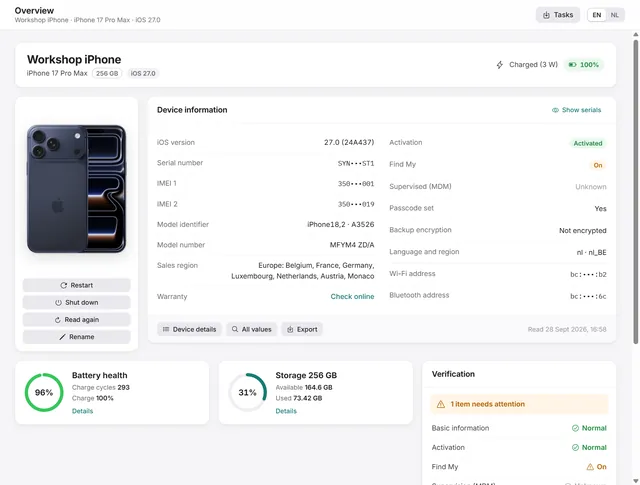
The Overview is the first page for a connected phone. It shows who the phone is, what state it is in and how healthy the battery and the storage are. On the free plan it shows the basics; with Pro, BenchDock reads the full device report.
The header
At the top: the name of the phone, the model, the capacity, the iOS version and the housing colour. On the right, the charging state (charged, charging with the wattage of the charger, connected but not charging, or on battery) and the battery percentage.
Device information
With Pro, the card Device information shows:
| Left | Right |
|---|---|
| iOS version and build | Activation |
| Serial number | Find My (on or off) |
| IMEI 1 and IMEI 2 | Supervised (MDM), with the organisation |
| Model identifier and regulatory model | Passcode set |
| Model number and sales region | Backup encryption |
| Logic board serial | Language and region |
| Warranty: Check online | Wi-Fi and Bluetooth address |
Click a serial number, IMEI or address to copy it. Check online copies the serial number and opens Apple's coverage page, where you paste it.
Values the phone does not return stay empty.
At the bottom of the card:
- Device details opens every identity field: name, model, board, modem firmware, boot loader, ECID, UDID, developer mode, installed profiles, time zone and more.
- All values opens a searchable table of every value BenchDock read, per section, and lists the sections the phone did not return.
- Export reads the phone again and saves the device report, as text in the language of the app or as complete JSON. Nothing is written to the phone.
- The time on the right shows when the phone was read.
Hide serials at the top of the card masks the serial number, IMEI numbers and addresses on screen and in PDF reports. Use it before you make a screenshot or share your screen. The same option is in Settings.
Battery and storage
Battery health is shown as a ring: green from 85 %, orange from 80 %, red below that. Next to it are the charge cycles and the current charge. Details shows the maximum capacity as in Settings on the phone, the full-charge capacity against the design capacity, temperature, voltage, current, the power source and the battery serial number as the battery itself reports it.
Storage shows how full the phone is. Details splits it into system, used and available space. For what exactly takes the space, see Storage.
Verification summary
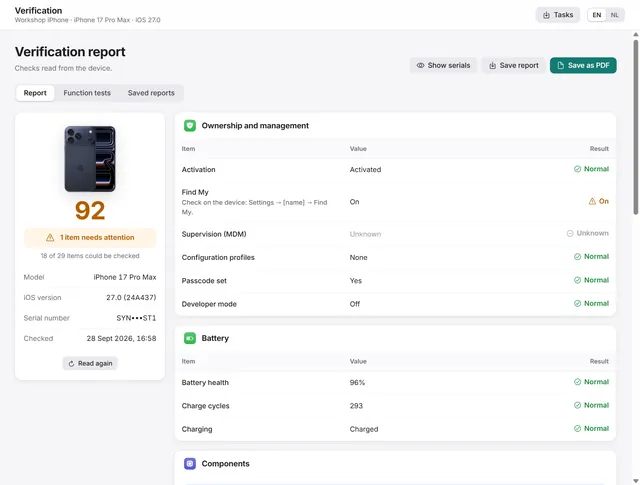
The card Verification gives a short verdict with the main checks, such as activation, Find My and the battery. View verification report opens the full report; see How to check a used iPhone.
Device actions
Under the photo of the phone:
- Restart and Shut down ask for confirmation first; the phone reacts at once.
- Read again reads the phone again, for example after you changed a setting on it.
- Rename changes the name of the phone, as shown in Finder, Apple Devices, AirDrop and Bluetooth.
Quick tools
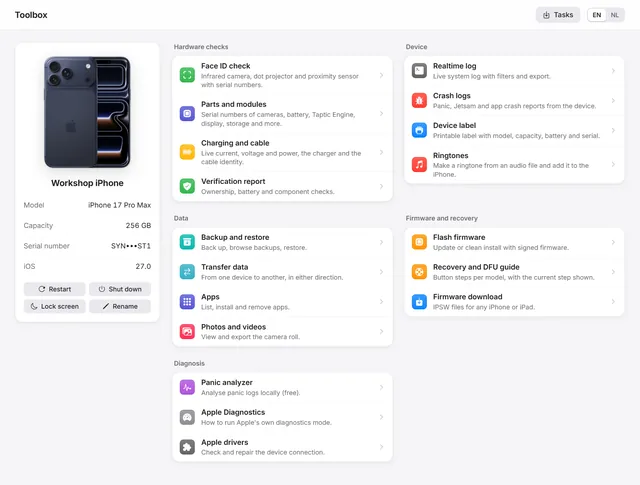
The row Quick tools at the bottom takes you straight to the Face ID check, charging and cable, parts and modules, backup, transfer, flashing, apps, photos, ringtones, the realtime log, crash logs and the device label.
On the free plan
Without Pro, the overview shows the name, model, iOS version, serial number, capacity and activation state from the connection itself, with the battery charge and the storage use. The button Read panic logs copies the panic logs of the phone into the panic analyzer. The full readout, battery health and the verification need Pro, as do restart, shut down and rename.
Questions
Is the battery health the same as in Settings on the phone?
The maximum capacity is the value iOS shows under Settings → Battery. BenchDock also calculates full-charge capacity divided by design capacity, which can differ slightly.
Why is a value empty?
The phone did not return it. Some values depend on the model and the iOS version; a device without a cellular modem has no IMEI, for example. All values lists the sections the phone did not return.
Related guides
-
 Device
How to check a used iPhone before you buy it
Activation, Find My, management, battery health and part records in one report, plus function tests, saved as PDF. Pro -
 Workshop tools
The Toolbox: parts, realtime log, crash logs and device label
Parts and serial numbers, the realtime log, crash logs, a printable device label, Apple Diagnostics and restart, shut down and rename. Free and Pro -
 Workshop tools
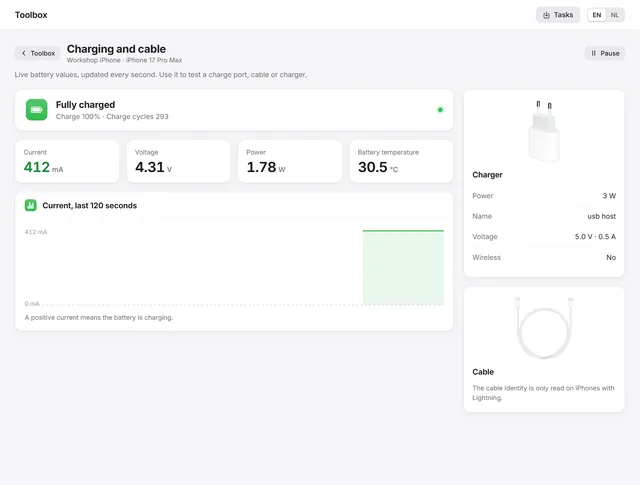
How to test an iPhone charging port and cable
Live current, voltage and power every second, the power source and the cable the phone reports, and the codes for not or slow charging. Pro -
 Getting started
Getting started with BenchDock
What you need, how to connect a phone and trust the computer, and how the window is laid out. Free