
Panic analysisFree
How to read an iPhone panic log and find the faulty part
When an iPhone hits a fault it cannot recover from, it restarts and writes a panic log. The log says which part of the system stopped, but in a form that takes experience to read. BenchDock reads it for you. It names the part to test or replace first, tells you how sure it is and quotes the line in the log that points to it. Panic analysis is free and runs entirely on your PC.
Get the log into BenchDock
Click Panic analyzer in the sidebar. There are three ways in, at the top right of the page:
- Import logs: choose one or more files. BenchDock accepts
.ips,.panic,.txt,.jsonand.crash, up to 20 MB per file. - Paste log text: paste the complete panic log, including the header with the device model, and click Analyse. Useful for a log a customer sent in a message.
- Read from device: with a phone connected and ready, BenchDock copies its panic logs over USB. Nothing is deleted from the phone.
Identical logs are imported once, so you can import the same folder again without creating duplicates. How to find panic logs on the phone itself: How to get panic logs from an iPhone.
Before your first log, the page also offers Open sample log: a synthetic example to look around.
The verdict
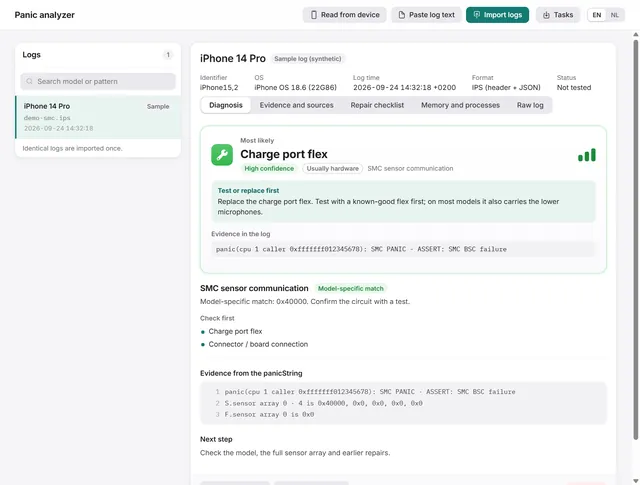
At the top of the diagnosis is the verdict, labelled Most likely:
- The part to test or replace first, for example the charge port flex, the battery or the wireless charging coil.
- The confidence: high, medium or low, with a meter.
- Hardware or software: Usually hardware, Hardware or software or Often software.
- Test or replace first: the concrete action for that part.
- Evidence in the log: the line in the log the verdict is based on.
- Also indicated: other parts named by the same code, for example when a published SMC code covers two flex cables at once.
- If that does not solve it: the parts to check next.
- The process that was running at the moment of the panic, and how many logs of this device have the same signature.
What the confidence means
| Confidence | When |
|---|---|
| High | An exact link between model and code, such as an SMC sensor code or a missing sensor with a known location, that several repair sources agree on. |
| Medium | The log names the subsystem explicitly, and repair sources point to this part first. |
| Low | The direction is right, but software or another part is just as likely. Watchdog timeouts, kernel data aborts and GPU faults are examples. |
When one log names several subsystems, the confidence drops one step and BenchDock advises to check the shared connector or board area first.
What BenchDock recognises
BenchDock reads the panic text itself and ignores the list of loaded drivers further down, because a loaded driver is not a cause. The rules run in this order:
- Missing sensors. Lines like
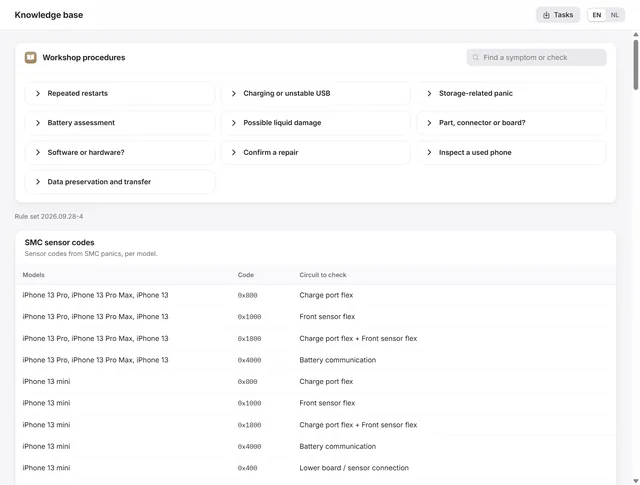
Missing sensor(s): mic1point to a specific flex cable.mic1andprs0sit on the charge port flex,mic2on the power button or flash flex, andTG0B,TG0VandTB0Von the battery. - SMC sensor codes per model. The sensor array in an SMC panic (for example
0x400000) maps to a part for each model, from the iPhone 13 series to the iPhone 16 Pro. The codes come from three published repair tables. High confidence needs at least two tables that agree, or a confirmed repair. - General rules: memory, storage, the always-on processor, I²C, heat and watchdog timeouts. A phone that restarts about three minutes after it starts, with
no successful checkins from com.apple.thermalmonitordin the log, points to a temperature sensor: the battery or the charge port flex. - 24 families of panics per part: Face ID, Touch ID, Secure Enclave, storage (NAND), baseband, Wi-Fi, display, touch, camera, audio, charging IC, USB-C, wireless charging, battery, power management, processor, GPU, NFC, UWB, motion sensors, proximity sensor, haptics and more.
- The backtrace, only as a weak hint when nothing else matches.
Logs without a model
A log copied from a photo or a forum post often misses the model line. BenchDock then reads the board name from the log, for example target/d64/ for an iPhone 13 Pro Max. It also reads text from a photo where the letter O stands in for a zero (Ox400000) or a V for a slash.
The tabs of a case
| Tab | What it shows |
|---|---|
| Diagnosis | The verdict, every finding with its strength and the parts to check first, the evidence and the next step. |
| Evidence and sources | Each rule that matched, with the evidence lines, the version of the rule set and the repair sources behind it. |
| Repair checklist | The steps for this repair, the repair status and your bench notes. See Cases. |
| Memory and processes | Memory state and the processes at the moment of the panic, largest first. Only when the log contains them. |
| Raw log | The complete log as text. It contains device identifiers and is left out of exported reports. |
Above the tabs, the case shows the model identifier, the iOS version, the time in the log and its format. For full logs it also lists the board, the incident ID, the OS build and the kernel.
Export a report
Click Export report at the bottom of a case to save a text report: the device and iOS version, the repair status, and every finding with the parts to check, the steps and the repair sources. The raw log, the file name, your notes and the device ID stay out of the report, so you can hand it to a customer or a colleague.
When no pattern is recognised
The verdict then says No known pattern. Import more logs from the same phone and compare them: a pattern that repeats is more telling than a single log. Read the raw log for the process and the subsystem named in the first lines. An unknown pattern stays unknown.
Questions
Does the log leave my PC?
No. The analysis runs on your PC; logs and notes are stored locally.
Which iPhones are covered?
Every iPhone and iPad that writes panic logs. The model-specific SMC tables cover the iPhone 13 series to the iPhone 16 Pro; other models get the general rules and the 24 families.
Is the verdict always right?
It names the part to test first and says how sure it is. A high confidence is based on published repair tables and confirmed repairs, but a panic log is a symptom, not a measurement. Test the part before you replace it, and mark the outcome in the case.
Related guides
-
 Panic analysis
How to get panic logs from an iPhone
Read panic logs over USB, find them under Analytics Data on the phone, or paste the text a customer sends you. Free -
 Panic analysis
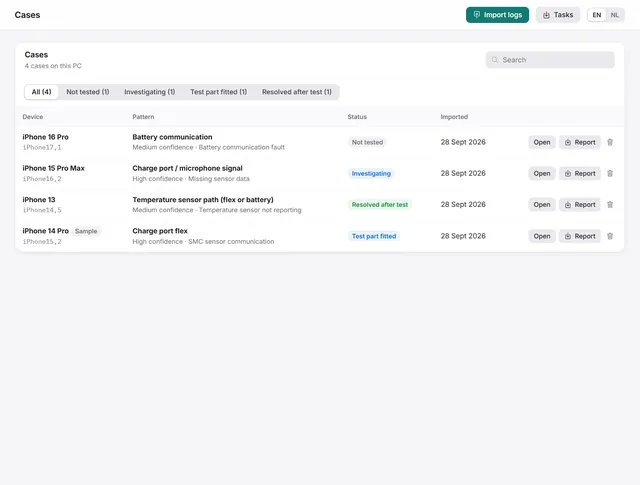
Cases: keep every panic log with notes, a checklist and the outcome
Each log becomes a case with a repair checklist, bench notes and a repair status. Search, filter and export them. Free -
 Panic analysis
The knowledge base: SMC codes, panic signatures and restore errors
SMC sensor codes per model, panic signatures with the part to test first, restore error codes and ten workshop procedures. Free -
 Panic analysis
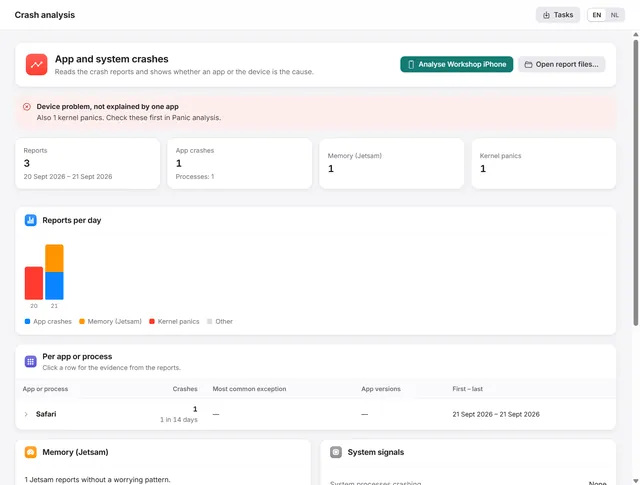
Crash analysis: is it the app or the iPhone?
Groups app crashes, memory stops and heat stops per app, and tells you whether an app or the device is the cause. Pro